
Whistle & Orders
The Pet Whistle is your remote control: check on a pet, tell it what to do, and give it a place to sleep.


The pet screen
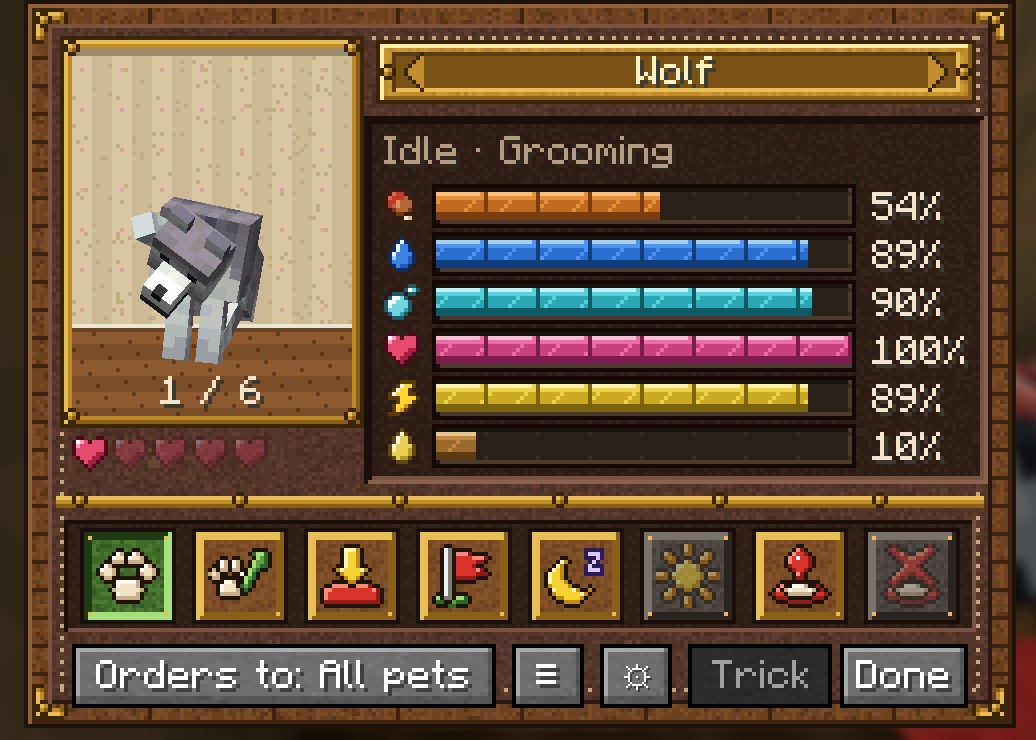
Right-click one of your pets with the whistle to open its screen: a portrait, what it's doing right now, its six needs with exact percentages, and the order buttons. Under the portrait, five hearts show its loyalty, with a red Ill next to them if it's ill.
Use the whistle in the air (not on a pet) to give orders to all your pets within 64 blocks at once.
Picking a pet
The screen lists every pet of yours within 64 blocks, plus an All pets entry. Step through them with the arrows on the name plate, the mouse wheel or the ← → keys; the counter under the portrait shows where you are (2 / 5). The pet you're looking at is outlined in white in the world, so you can see which one it is. The button at the bottom jumps straight to All pets, or back to the nearest pet. Next to it, ☰ opens the Pet Journal, the ⚙ gear opens the display settings, and Trick asks for a trick.
Orders
| Order | What the pet does |
|---|---|
| Idle | Roams around and looks after its own needs: eats, drinks, sleeps, goes to the toilet. The default for most pets. |
| Follow | Follows you, and teleports to you if it falls far behind. Still eats and sleeps when it needs to. Tamed wolves, cats, parrots and nautiluses start like this. |
| Stay | Animals that can sit, sit down; the rest stay put. |
| Go There | Use the whistle on a block (within 128 blocks): the pet walks there, then stays. If it can't get there within a minute it stays where it is. |
| Rest Here | Lies down and sleeps where it is. |
| Wake Up | Wakes a sleeping pet. |
| Rest Spot | Use the whistle on a block to set where this pet goes to sleep. Handy for big animals, or to give each dog its own bed. |
| Clear Spot | Removes the rest spot; it goes back to beds and perches. |
Pet Journal
Lost track of a pet? Press ☰ in the pet screen (or the link on the last page of the Pet Care Guide) to open the Pet Journal. It lists every pet you own, wherever it is:
- its name (or species) and current order;
- how far away it is, or which dimension it's in;
- its coordinates;
- Active if it's loaded right now, otherwise when and where it was last seen.
Pets near you come first, nearest first. Click a pet within 64 blocks to open it in the pet screen. Refresh updates the list.
The journal is kept by the server, so it remembers pets in unloaded chunks and other dimensions. A pet that dies, is set free or is given away drops off the list.
Floating status display
- Panel: look at one of your pets within 8 blocks to see its name and needs above its head.
- Alerts: a bubble with the most urgent need floats over any of your pets within 16 blocks.
- Markers: a small paw floats over each of your pets further than 5 blocks away (up to 48), and shows through walls, so you can pick yours out of a herd or find them in the house.
- Glow: while you hold the Pet Whistle, your pets glow gold.
- Press J to cycle: everything → alerts and markers only → off. Rebind it under Options → Controls → Vanilla Pets.
Only you see the markers and glow on your pets; other players see theirs.
To change the ranges or switch each part on and off, press the ⚙ gear in the pet screen. It opens Vanilla Pets Settings (also under Config in NeoForge's Mods list, and in Mod Menu on Fabric). Changes are saved right away, in config/vanillapets-client.json:
{
  "showPanel": true,
  "showAlerts": true,
  "panelRange": 8.0,
  "alertRange": 16.0,
  "showMarkers": true,
  "markerRange": 48.0,
  "glowWithWhistle": true
}