
Getting Started
Your first hour with Vanilla Pets, step by step: from crafting the two tools you need to a pet that looks after itself. Everything here works in survival, with no commands.
In short: craft a Pet Whistle and a Pet Collar, adopt an animal, put its bowls, bed and toilet close together, and set it to Idle right there. Then keep the bowls full. How It Works explains why this is enough.
-
Install the mod 2 min
Download the jar for your loader from the download page and drop it into your
modsfolder.- Fabric: needs Fabric Loader and Fabric API.
- NeoForge: nothing else needed.
For multiplayer, install it on the server and on every player's game.
-
Craft a Pet Whistle and a Pet Collar 5 min
The whistle is your remote control: it shows a pet's needs and gives it orders. The collar adopts any animal that can't be tamed the vanilla way. Make a few collars; each one is used up.


 2
2 -
Adopt your first pet 5 min
If the animal is… Do this Tameable in vanilla (wolf, cat, parrot, horse, donkey, mule, llama, nautilus...) Tame it the vanilla way. It becomes your pet automatically. Anything else (cow, pig, fox, rabbit, chicken, goat, panda, axolotl, bee, strider...) Use a Pet Collar on it. Hearts pop up and you get a message such as “Biscuit is now your pet!”. Not sure what your animal will need? Look it up in Animals.
Changed your mind? Sneak and use a collar on your pet twice to set it free; you get the collar back.
Your free Pet Care Guide
With your first pet you also get a Pet Care Guide, once per player. Right-click it to read it: a short book on needs, bowls, toilets, sleep, orders, play and washing. Its last page opens the Pet Journal. Lost it, or want one for a friend? Craft another from a book and a lead or any kibble.


 Tip: a good first pet is a dog or a cat. They show off the most: bowls, beds, toilet habits, toys and their own animations.
 -
Build a pet corner 15 min
Put everything your pet uses close together, within about 12 blocks of where it will live. What you need depends on the animal:
Cat, ocelot Dog Fox Parrot Farm animals, horses Others Food Food Bowl Food Bowl Food Bowl Food Bowl Feed Trough or grass Food Bowl (rabbits also graze) Water Water Bowl Water Bowl Water Bowl Water Bowl Water Trough or a pond Water Bowl or a pond Sleep Pet Bed or Cat Tree Pet Bed Pet Bed Bird Perch Lies down anywhere Rabbits: Pet Bed; the rest lie down anywhere Toilet Litter Box Pee Pad or outdoors Litter Box or outdoors — — — 
Food Bowl
Holds 4 servings. Fill with any kibble or a hay bale (full) or other food (1 serving each).

Water Bowl
Holds 4 servings. Fill with a water bucket (full) or a water bottle (2 servings).

Pet Bed
Where cats, ocelots, dogs, foxes and rabbits sleep when they have no rest spot of their own.

Litter Box
Cats, ocelots and foxes step in to use it. Clean with a shovel, refill with Cat Litter or sand.

Pee Pad
Dogs use it indoors. Soaks up 3 uses, then break it and put down a fresh one.

Bird Perch
Parrots roost on its branch at night and like to sit on it during the day.
- Food Bowl: use Pet Kibble or a hay bale on it to fill it (4 servings); any other food adds one serving.
- Water Bowl: a water bucket fills it; a water bottle adds two servings.
- Troughs hold 6 servings: a hay bale or a water bucket fills one. Place them side by side for one long trough.
- Litter Box: comes ready to use. Clean it with a shovel when it's full, and top it up with Cat Litter or sand.
Every item and block has its own page with its recipe: see Items and Blocks.
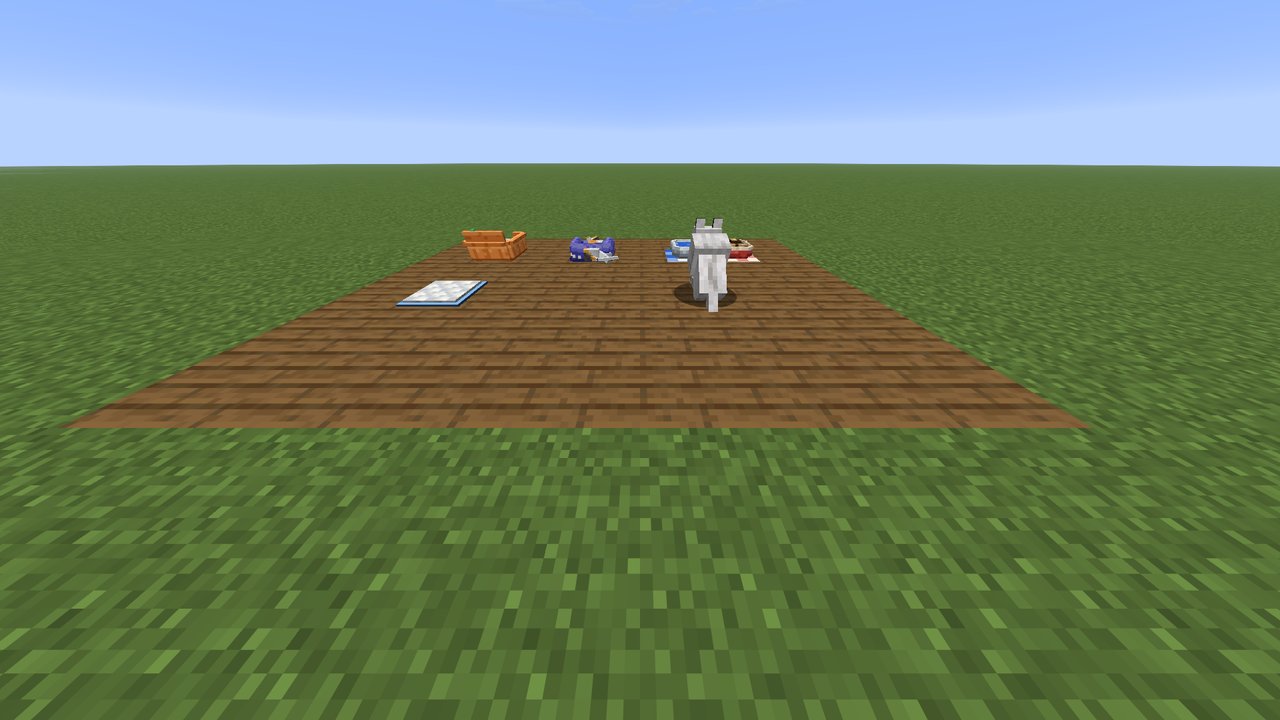
A finished pet corner: bowls, a bed, a litter box and a pee pad within a few blocks of each other. -
Open the whistle screen and set it to Idle 5 min
Use the whistle on your pet to open its screen: its portrait, what it's doing right now, its six needs, and the order buttons.
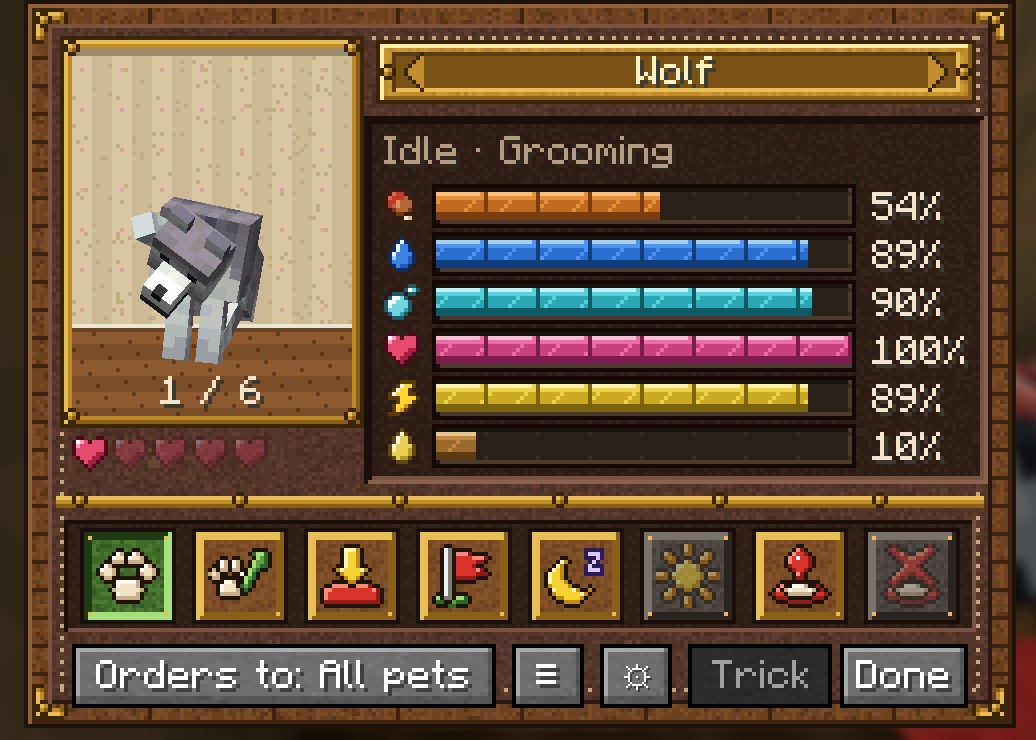
The pet screen. Hover a need to see what fills it. Stand your pet in the middle of its pet corner and press Idle. That spot is now its home: it roams within 12 blocks of it and uses everything you put there.
- Step through your pets with the arrows on the name plate, the mouse wheel or ← →. The pet you're looking at is outlined in white.
- The All pets entry sends orders to all your pets within 64 blocks. Using the whistle in the air opens the screen on All pets straight away.
- Taking a pet along? Press Follow. Need it to wait? Stay. But a pet on Stay won't go and eat, so don't forget it.
More in Whistle & Orders.
-
Learn to read your pet 5 min
Look at it from up to 8 blocks away: a small panel shows its name and needs. A bubble appears over any of your pets within 16 blocks with an urgent need, showing what it wants.
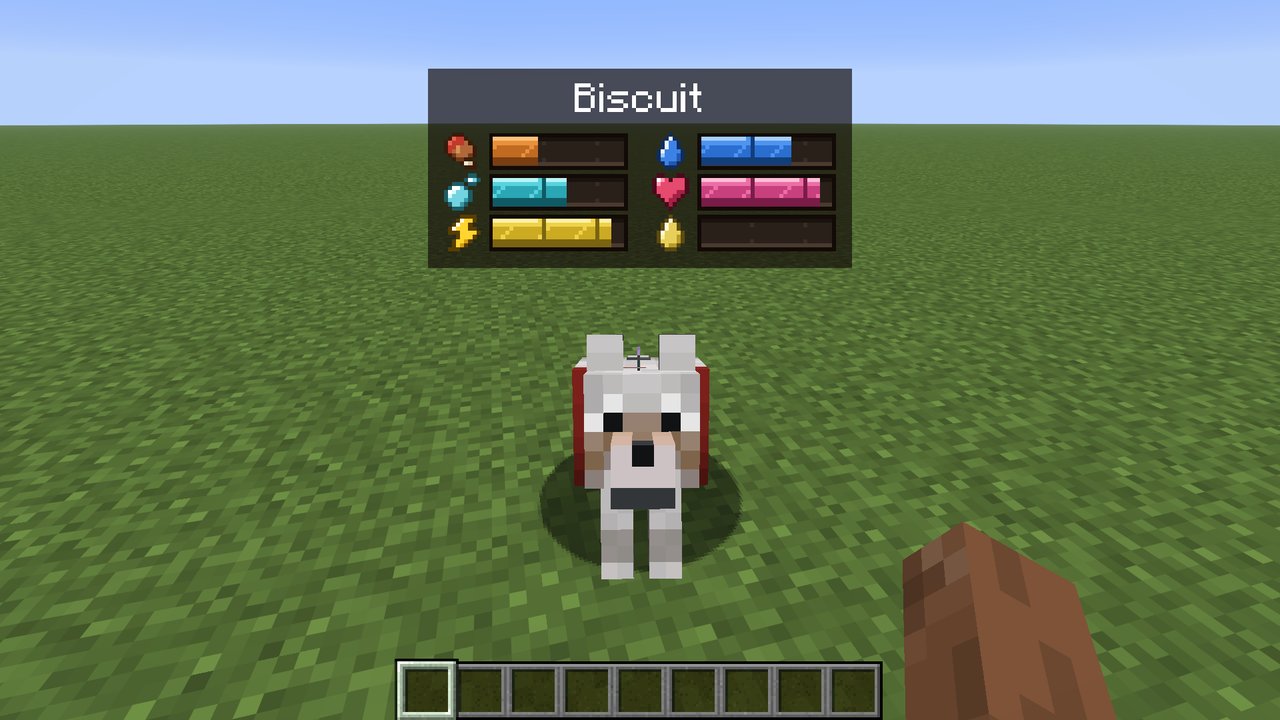
Biscuit is hungry (red bar) but otherwise fine. 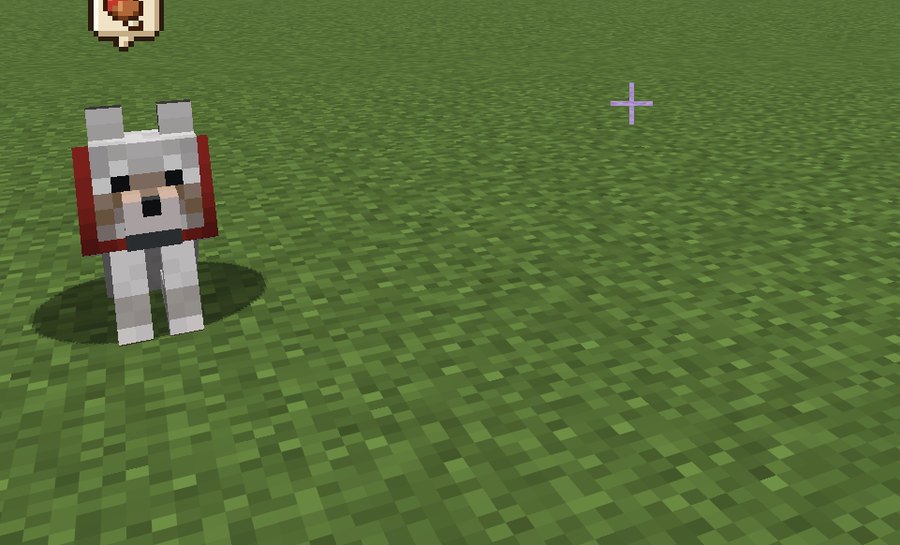
An alert bubble: this one wants water. From further away, a small paw marker floats over each of your pets (through walls too), and they glow gold while you hold the whistle. Press J to switch the floating display between everything, alerts and markers, and off. The ⚙ gear in the pet screen opens the settings, where you can turn each part on or off and change how far it shows.
-
Look after it the rest of the hour
- Pet it: sneak and use an empty hand on it. (Horses, donkeys, mules, llamas, camels and nautiluses: sneaking opens their inventory as usual, so brush them instead.)
- Hand-feed it: use its food or a kibble on it. Many animals have a favourite kibble that makes them extra happy.
- Groom it: Pet Brush. Wash it: a water bucket to rinse, then Pet Soap while it's still wet. Cats hate the bucket!
- Play: throw a Pet Ball or Ball of Yarn, or wave a Feather Wand.
- Walk your dog: put it on a lead and go outside. It cheers up, and on grass it stops to do its business. More about walks.
All this care makes your pet more loyal. Dogs, cats, ocelots, foxes and parrots learn tricks as their loyalty grows: try the Trick button in the pet screen. See Loyalty & Vet Care.
See Needs & Care for everything that fills each bar.
After the first hour
Your pet should now be doing most things on its own. A quick checklist:
- Its bowls (or troughs) have food and water in them.
- It has somewhere to sleep, and (cats, dogs, foxes) somewhere to go to the toilet, or a way outside.
- It's on Idle at home, or Following you.
- You know where to look: the panel, the alert bubbles and the J key. The Pet Journal finds pets you've lost track of.
- Keep a First Aid Kit handy, in case a neglected pet falls ill.